The basic procedure to build an RPM is as follows:
* Get the source code you are building the RPM for to build on your system.
* Make a patch of any changes you had to make to the sources to get them to build properly.
* Make a spec file for the package.
* Make sure everything is in its proper place.
* Build the package using RPM.
Under normal operation, RPM builds both binary and source packages.
One of the most typical and important task is to make the spec file.
Still i am collecting information about the spec file and in next post i will be writing about it and make a sample spec file.
enjoy... make world open.
Monday, January 30, 2006


Friday, January 27, 2006
Steve Job Words...
I'm pretty sure none of this would have happened if I hadn't been fired from Apple. It was awful tasting medicine, but I guess the patient needed it. Sometimes life hits you in the head with a brick. Don't lose faith. I'm convinced that the only thing that kept me going was that I loved what I did. You've got to find what you love. And that is as true for your work as it is for your lovers. Your work is going to fill a large part of your life, and the only way to be truly satisfied is to do what you believe is great work. And the only way to do great work is to love what you do. If you haven't found it yet, keep looking. Don't settle. As with all matters of the heart, you'll know when you find it. And, like any great relationship, it just gets better and better as the years roll on. So keep looking until you find it. Don't settle.
Saturday, January 07, 2006
Useful tips from Ain Vagula for updating UI strings to newer version of OpenOffice.
Following steps are needed when migrating to UI strings with no duplicates:
- install updated toolkit
- generate sdf file from your existing translated or half-translated po-s with new toolkit
(to avoid english strings in untranslated entries)
- backup old po-s somewhere
- generate new set of po-files from just generated sdf-file for your language
- update generated po-files with latest pot-files. Now every duplicated string in
one file has unique identifier, but string itself is translated as it was in
your old po-file.
Note that:
- When you do not regenerate po files, all duplicate entries will be untranslated.
- When you use sdf file, generated with old toolkit, for regenerating,untranslated
entries will be filled with english strings
thanks Ain as these steps are working really fine for me :-)).
- install updated toolkit
- generate sdf file from your existing translated or half-translated po-s with new toolkit
(to avoid english strings in untranslated entries)
- backup old po-s somewhere
- generate new set of po-files from just generated sdf-file for your language
- update generated po-files with latest pot-files. Now every duplicated string in
one file has unique identifier, but string itself is translated as it was in
your old po-file.
Note that:
- When you do not regenerate po files, all duplicate entries will be untranslated.
- When you use sdf file, generated with old toolkit, for regenerating,untranslated
entries will be filled with english strings
thanks Ain as these steps are working really fine for me :-)).
Thursday, January 05, 2006
How to extract files from rpm and deb packages
* rpm package can be extracted by issuing this command at the command line.
$rpm2cpio {rpm-package name} | cpio -idv
* deb packages can be extracted by issuing this command at the command line.
$dpkg-deb -x {deb-package name} {target directory}
Enjoy..
$rpm2cpio {rpm-package name} | cpio -idv
* deb packages can be extracted by issuing this command at the command line.
$dpkg-deb -x {deb-package name} {target directory}
Enjoy..
Friday, December 16, 2005
Marathi OpenOffice2.0
Huhh... Got into the grooves again. Now i am working for marathi openoffice 2.0 and hoping of completing it by this weekends.
Again i am facing the same old problem with the PO files while converting it to OpenOffice GSI file. I don't know why they are repeating time and again the same problem of changing the format and directory structure of the PO files. I repeatedly posted that PO file is not a simple text file with any sort of directory structure, they are there with some pre-defined cause and one should follow the standards while translating it.
Simple and easy trick is... Don't do anything other than translating the msg strings.
I am still cleaning the dirty laundry for which i am not responsible.
Again i am facing the same old problem with the PO files while converting it to OpenOffice GSI file. I don't know why they are repeating time and again the same problem of changing the format and directory structure of the PO files. I repeatedly posted that PO file is not a simple text file with any sort of directory structure, they are there with some pre-defined cause and one should follow the standards while translating it.
Simple and easy trick is... Don't do anything other than translating the msg strings.
I am still cleaning the dirty laundry for which i am not responsible.
Monday, November 21, 2005
Installing ALSA in debian sarge 2.6.8-2-386
Install alsa-base (apt-get install alsa-base) and alsa-utils (apt-get install alsa-utils).
Make sure you're part of the "audio" group for this edit /etc/group file as
audio:*:29:username
if the above line is not there.
Run $/sbin/modprobe snd-emu10k1 ; if it doesn't work try with snd-emu10k2 OR snd-ca0106
Now run $alsaconf ; this is an alsa configurator and detects the sound card and configure it.
srd24:~# alsaconf
Unloading ALSA sound driver modules: snd-emu10k1-synth snd-emux-synth snd-seq-v irmidi snd-seq-midi-emul snd-seq-oss snd-seq-midi snd-seq-midi-event snd-seq sn d-emu10k1 snd-util-mem snd-hwdep snd-intel8x0 snd-ac97-codec snd-pcm-oss snd-mi xer-oss snd-pcm snd-timer snd-page-alloc snd-mpu401-uart snd-rawmidi snd-seq-de vice.
Building card database...
Running update-modules...
Loading driver...
Setting up ALSA....
Setting default volumes...
Saving the mixer setup used for this in /var/lib/alsa/asound.state.
===============
Now ALSA is ready to use.
For adjustment of volumes, use your favorite mixer.
Have a lot of fun!
Here are the choices:
intel8x0 Intel Corp. 82801AA AC'97 Audio (rev 02)
legacy probe legacy ISA (non-PnP) chips
I select the intel card and pressed enter. Now I get this:
Configuring snd-intel8x0
Do you want to modify /etc/modprob.d/sound
(And /etc/modprobe.conf if present)?
I select 'yes' and press enter.
"OK, sound driver is configured.
ALSA CONFIGURATOR
will prepare the card for playing now.
Now I will load the ALSA sound driver and use amixer to raise the default sound volumes.
You can change the volume later via a mixer.
I select and press ok.
Running update-modules...
Loading Driver...
Setting up ALSA...
Setting default volumes...
===
Now ALSA is ready to use
For adjustment of volumes, use your favorite mixer.
Have a lot of fun!
---------------------------------------
---------------------------------------
Finally, alsamixer and volume control is working otherwise it was giving error as
$alsamixer
alsamixer: function snd_ctl_open failed for default: No such device
and when volume control is selected it is giving error as
no volume control elements and/or devices found.
Make sure you're part of the "audio" group for this edit /etc/group file as
audio:*:29:username
if the above line is not there.
Run $/sbin/modprobe snd-emu10k1 ; if it doesn't work try with snd-emu10k2 OR snd-ca0106
Now run $alsaconf ; this is an alsa configurator and detects the sound card and configure it.
srd24:~# alsaconf
Unloading ALSA sound driver modules: snd-emu10k1-synth snd-emux-synth snd-seq-v irmidi snd-seq-midi-emul snd-seq-oss snd-seq-midi snd-seq-midi-event snd-seq sn d-emu10k1 snd-util-mem snd-hwdep snd-intel8x0 snd-ac97-codec snd-pcm-oss snd-mi xer-oss snd-pcm snd-timer snd-page-alloc snd-mpu401-uart snd-rawmidi snd-seq-de vice.
Building card database...
Running update-modules...
Loading driver...
Setting up ALSA....
Setting default volumes...
Saving the mixer setup used for this in /var/lib/alsa/asound.state.
===============
Now ALSA is ready to use.
For adjustment of volumes, use your favorite mixer.
Have a lot of fun!
Here are the choices:
intel8x0 Intel Corp. 82801AA AC'97 Audio (rev 02)
legacy probe legacy ISA (non-PnP) chips
I select the intel card and pressed enter. Now I get this:
Configuring snd-intel8x0
Do you want to modify /etc/modprob.d/sound
(And /etc/modprobe.conf if present)?
I select 'yes' and press enter.
"OK, sound driver is configured.
ALSA CONFIGURATOR
will prepare the card for playing now.
Now I will load the ALSA sound driver and use amixer to raise the default sound volumes.
You can change the volume later via a mixer.
I select and press ok.
Running update-modules...
Loading Driver...
Setting up ALSA...
Setting default volumes...
===
Now ALSA is ready to use
For adjustment of volumes, use your favorite mixer.
Have a lot of fun!
---------------------------------------
---------------------------------------
Finally, alsamixer and volume control is working otherwise it was giving error as
$alsamixer
alsamixer: function snd_ctl_open failed for default: No such device
and when volume control is selected it is giving error as
no volume control elements and/or devices found.
Wednesday, November 16, 2005
How to install more than one version of OpenOffice.org?
*How to install more than one version of OpenOffice.org?*
Windows:
1. open WINDOWS START MENU -> RUN ...
2. insert the path and file to the setup OR browse to the location
3. add at the end (behind the setup.exe) " /a" and click OK
4. the setup program start
5. select the location where you want to install OpenOffice.org
6. start the OpenOffice.org the directory where you have install it.
When you install the OpenOffice.org with the option /a then you have NO
systemintegration. (no start menu entries and no file association)
Linux:
1. open new shell
2. change to the directory where all the rpm packages are. (f.e.
/temp/openoffice/rpm)
3. f.e. you want to install the office into the directory
/home/user1/office then insert
rpm -vh --install --dbpath /home/user1/office/.rpm
--nodeps --prefix /home/user1/office/ openoffice*.rpm
after the rpm installation you can start the office from the path
/home/user1/office/program/soffice
When you install the office in this way you have no systemintegration
(no start menu entries and no file association)
Solaris and X86:
It's not possible to install more then one office at once.
*If the instructions above do not work, the you need to change your
UserConfigDirectory.*
1. Open the file bootstraprc(Linux)/bootstrap.ini(windows) in a editor.
2. Change the line UserInstallation=$SYSUSERCONFIG/.openoffice_english
into UserInstallation=$SYSUSERCONFIG/.openoffice_dutch or any other
directory you want.
===========
Rafaella Braconi.
Windows:
1. open WINDOWS START MENU -> RUN ...
2. insert the path and file to the setup OR browse to the location
3. add at the end (behind the setup.exe) " /a" and click OK
4. the setup program start
5. select the location where you want to install OpenOffice.org
6. start the OpenOffice.org the directory where you have install it.
When you install the OpenOffice.org with the option /a then you have NO
systemintegration. (no start menu entries and no file association)
Linux:
1. open new shell
2. change to the directory where all the rpm packages are. (f.e.
/temp/openoffice/rpm)
3. f.e. you want to install the office into the directory
/home/user1/office then insert
rpm -vh --install --dbpath /home/user1/office/.rpm
--nodeps --prefix /home/user1/office/ openoffice*.rpm
after the rpm installation you can start the office from the path
/home/user1/office/program/soffice
When you install the office in this way you have no systemintegration
(no start menu entries and no file association)
Solaris and X86:
It's not possible to install more then one office at once.
*If the instructions above do not work, the you need to change your
UserConfigDirectory.*
1. Open the file bootstraprc(Linux)/bootstrap.ini(windows) in a editor.
2. Change the line UserInstallation=$SYSUSERCONFIG/.openoffice_english
into UserInstallation=$SYSUSERCONFIG/.openoffice_dutch or any other
directory you want.
===========
Rafaella Braconi.
Thursday, October 27, 2005
Finally got debian sarge running on my box.
huh!!!.. it was really frustating to install debian without CD-ROM but during the course of installing it i gained a lot of insight in to the debian installation tricks. It's really true that the debian installer is sucking very hard and is not for the masses. The one who installs it need some kind of great patience of doing same stuff time and time again without fail.
Anyway thanks to Kartik Mistry for his instant support and gave a insight of installing through netinstall-iso. I did it through USB-ZIP since my CD-ROM is not detecting the CD written with netinstall-iso. And finally installed all the required packages through apt-get.
Now, i got a complete running debian sarge box with gnome-2.10 ready to explore more.
Now i can concentrate more on glade and Gtk.
Anyway thanks to Kartik Mistry for his instant support and gave a insight of installing through netinstall-iso. I did it through USB-ZIP since my CD-ROM is not detecting the CD written with netinstall-iso. And finally installed all the required packages through apt-get.
Now, i got a complete running debian sarge box with gnome-2.10 ready to explore more.
Now i can concentrate more on glade and Gtk.
Friday, October 14, 2005
Why Debian ??
A couple of day's back my project co-ordinator Mr R.K.V.S Raman asked "why debian... why not fedora", that time i was speechless with only utterance of debian's huge repository and easy package management. And then i thought i have to justify my switch from Fedora to Debian.
Now this is a small feature list supporting Debian.
Debian is the world's leading non-commercial totally free Linux distribution. Remaining loyal to the concept upon which Linux was created, it is produced by hundreds of volunteer developers around the world. Contrary to a common misconception, Debian is not for Linux gurus only. As a matter of fact, as you will see on the guide pages, its advanced package management system makes it one of the easier distributions for new Linux users to work with. Here are just a few of its advantages:
* Non-Proprietary: Debian is a true GNU/Linux distribution using the standard UNIX style commands. This ensures that what you learn today won't be obsolete in two years and makes it easier to also learn how to work with UNIX systems.
* Easy Maintenance: A seamless, totally-integrated package management system makes it easy to keep your system up to date and free of orphan files and incompatible products. Most dependent packages are handled automatically so you don't get the "Failed dependencies" error commonly encountered when trying to add software on RPM-based systems like Red Hat and Suse.
* Automated Patching: The Debian package system also allows you to use a single command to update your entire system (operating system and installed packages) over the Internet. This allows you to use a scheduler to routinely run a shell script to automatically update your system with the latest program, OS, and security patches.
* Extensive: Only free software packages (applications, utilities, etc.) are allowed to be included in the official Debian distributions, and the current binary distribution comes on 14 CDs because there are over 10,000 of them. With Debian, you don't have different "server" and "workstation" or "personal" editions. It's everything all in one.
* Support Options: Peer support is available through a community of listservs (mailing lists) and chat rooms. Replies to messages may even be from those who helped develop the product. And since you're likely not the first person to encounter a given issue, there are also searchable archives of listserv messages. If your company requires commercial support contracts fear not. Numerous for-profit support operations offer a variety of technical support options. With Debian, you don't have to worry about forced upgrades due to vendors dropping support for older versions.
* Minimal Investment: Debian's peformance is excellent even with the modest hardware requirements Linux is famous for. While most OSs require newer, faster, bigger hardware, Debian allows you to utilize those old Pentium systems instead of throwing them into a landfill. This, along with the fact that you can load a single copy of Debian on as many systems as you want, means you can set up a full-blown enterprise at very little cost.
* Reliable: Debian's focus on stability and reliability results in servers that you may have to reboot once a year, rather than once a month.
* User-centric: New versions of Debian are developed when major changes warrant one, not to generate revenues from upgrades. (You need only look at the version numbers of the various distributions to verify this.)
Taken from http://www.aboutdebian.com/
Now this is a small feature list supporting Debian.
Debian is the world's leading non-commercial totally free Linux distribution. Remaining loyal to the concept upon which Linux was created, it is produced by hundreds of volunteer developers around the world. Contrary to a common misconception, Debian is not for Linux gurus only. As a matter of fact, as you will see on the guide pages, its advanced package management system makes it one of the easier distributions for new Linux users to work with. Here are just a few of its advantages:
* Non-Proprietary: Debian is a true GNU/Linux distribution using the standard UNIX style commands. This ensures that what you learn today won't be obsolete in two years and makes it easier to also learn how to work with UNIX systems.
* Easy Maintenance: A seamless, totally-integrated package management system makes it easy to keep your system up to date and free of orphan files and incompatible products. Most dependent packages are handled automatically so you don't get the "Failed dependencies" error commonly encountered when trying to add software on RPM-based systems like Red Hat and Suse.
* Automated Patching: The Debian package system also allows you to use a single command to update your entire system (operating system and installed packages) over the Internet. This allows you to use a scheduler to routinely run a shell script to automatically update your system with the latest program, OS, and security patches.
* Extensive: Only free software packages (applications, utilities, etc.) are allowed to be included in the official Debian distributions, and the current binary distribution comes on 14 CDs because there are over 10,000 of them. With Debian, you don't have different "server" and "workstation" or "personal" editions. It's everything all in one.
* Support Options: Peer support is available through a community of listservs (mailing lists) and chat rooms. Replies to messages may even be from those who helped develop the product. And since you're likely not the first person to encounter a given issue, there are also searchable archives of listserv messages. If your company requires commercial support contracts fear not. Numerous for-profit support operations offer a variety of technical support options. With Debian, you don't have to worry about forced upgrades due to vendors dropping support for older versions.
* Minimal Investment: Debian's peformance is excellent even with the modest hardware requirements Linux is famous for. While most OSs require newer, faster, bigger hardware, Debian allows you to utilize those old Pentium systems instead of throwing them into a landfill. This, along with the fact that you can load a single copy of Debian on as many systems as you want, means you can set up a full-blown enterprise at very little cost.
* Reliable: Debian's focus on stability and reliability results in servers that you may have to reboot once a year, rather than once a month.
* User-centric: New versions of Debian are developed when major changes warrant one, not to generate revenues from upgrades. (You need only look at the version numbers of the various distributions to verify this.)
Taken from http://www.aboutdebian.com/
Monday, October 10, 2005
Error while building OO2.0 in "package" module on Ubuntu 5.04 "Hoary Hedgehog".
I am using "ooo_SRC680_m125_src" source, while building it crashed in package module giving error as:
/home/vijay/ooo_SRC680_m125_src/package/source/zippackage
------------------------------
Making: ../../unxlngi4.pro/slo/ZipPackage.obj
g++ -Wuninitialized -fmessage-length=0 -c -I. -I../../unxlngi4.pro/inc -I../inc -I../../inc -I../../unx/inc -I../../unxlngi4.pro/inc -I. -I/home/vijay/ooo_SRC680_m125_src/solver/680/unxlngi4.pro/inc/stl -I/home/vijay/ooo_SRC680_m125_src/solver/680/unxlngi4.pro/inc/external -I/home/vijay/ooo_SRC680_m125_src/solver/680/unxlngi4.pro/inc -I/home/vijay/ooo_SRC680_m125_src/solenv/unxlngi4/inc -I/home/vijay/ooo_SRC680_m125_src/solenv/inc -I/home/vijay/ooo_SRC680_m125_src/res -I/home/vijay/ooo_SRC680_m125_src/solver/680/unxlngi4.pro/inc/stl -I/home/vijay/ooo_SRC680_m125_src/solenv/inc/Xp31 -I/usr/lib/j2sdk1.4-sun/include -I/usr/lib/j2sdk1.4-sun/include/linux -I/usr/lib/j2sdk1.4-sun/include/native_threads/include -I/usr/X11R6/include -I. -I../../res -I. -O1 -pipe -mcpu=pentiumpro -Wno-ctor-dtor-privacy -include preinclude.h -fexceptions -fno-enforce-eh-specs -fpic -DLINUX -DUNX -DVCL -DGCC -DC300 -DINTEL -DGXX_INCLUDE_PATH=/usr/include/c++/3.3 -DCVER=C300 -D_USE_NAMESPACE -DGLIBC=2 -DX86 -D_PTHREADS -D_REENTRANT -DNEW_SOLAR -D_USE_NAMESPACE=1 -DSTLPORT_VERSION=400 -D__DMAKE -DUNIX -DCPPU_ENV=gcc3 -DSUPD=680 -DPRODUCT -DNDEBUG -DPRODUCT_FULL -DOSL_DEBUG_LEVEL=0 -DOPTIMIZE -DEXCEPTIONS_ON -DCUI -DSOLAR_JAVA -DSRC680 -DSHAREDLIB -D_DLL_ -DMULTITHREAD -o ../../unxlngi4.pro/slo/ZipPackage.o /home/vijay/ooo_SRC680_m125_src/package/source/zippackage/ZipPackage.cxx
In file included from /home/vijay/ooo_SRC680_m125_src/package/source/zippackage/ZipPackage.cxx:74:
../../inc/ZipPackageFolder.hxx: In member function `void ZipPackageFolder::setRemoveOnInsertMode_Impl(unsigned char)':
../../inc/ZipPackageFolder.hxx:124: error: invalid pointer to bit-field `ZipPackageEntry::mbAllowRemoveOnInsert'
dmake: Error code 1, while making '../../unxlngi4.pro/slo/ZipPackage.obj'
'---* tg_merge.mk *---'
ERROR: Error 65280 occurred while making /home/vijay/ooo_SRC680_m125_src/package/source/zippackage
I guess the problem is probably caused by the use of gcc-3.3, the same error on linux with gcc 3.2. This was introduced between m116 and m117.
This is the fix for the problem.
diff -ur package/inc/ZipPackageFolder.hxx package_new/inc/ZipPackageFolder.hxx
--- package/inc/ZipPackageFolder.hxx 2005-07-12 14:28:10.000000000 +0200
+++ package_new/inc/ZipPackageFolder.hxx 2005-07-14 17:30:52.000000000 +0200
@@ -121,7 +121,7 @@
}
void setPackageFormat_Impl( sal_Bool bPackageFormat ) { m_bPackageFormat = bPackageFormat; }
- void setRemoveOnInsertMode_Impl( sal_Bool bRemove ) { ZipPackageEntry::mbAllowRemoveOnInsert = bRemove; }
+ void setRemoveOnInsertMode_Impl( sal_Bool bRemove ) { this->mbAllowRemoveOnInsert = bRemove; }
// Recursive functions
void saveContents(rtl::OUString &rPath, std::vector < com::sun::star::uno::Sequence < com::sun::star::beans::PropertyValue > > &rManList, ZipOutputStream & rZipOut, com::sun::star::uno::Sequence < sal_Int8 > &rEncryptionKey, rtlRandomPool & rRandomPool)
diff -ur package/source/zippackage/ZipPackageFolder.cxx
package_new/source/zippackage/ZipPackageFolder.cxx
--- package/source/zippackage/ZipPackageFolder.cxx 2005-07-12 14:31:33.000000000 +0200
+++ package_new/source/zippackage/ZipPackageFolder.cxx 2005-07-14 17:31:14.000000000 +0200
@@ -128,7 +128,7 @@
{
OSL_ENSURE( m_xFactory.is(), "No factory is provided to the package folder!" );
- ZipPackageEntry::mbAllowRemoveOnInsert = bAllowRemoveOnInsert;
+ this->mbAllowRemoveOnInsert = bAllowRemoveOnInsert;
SetFolder ( sal_True );
aEntry.nVersion = -1;
diff -ur package/source/zippackage/ZipPackageStream.cxx package_new/source/zippackage/ZipPackageStream.cxx
--- package/source/zippackage/ZipPackageStream.cxx 2005-07-12 14:31:48.000000000 +0200
+++ package_new/source/zippackage/ZipPackageStream.cxx 2005-07-14 17:32:10.000000000 +0200
@@ -137,7 +137,7 @@
{
OSL_ENSURE( m_xFactory.is(), "No factory is provided to ZipPackageStream!\n" );
- ZipPackageEntry::mbAllowRemoveOnInsert = bAllowRemoveOnInsert;
+ this->mbAllowRemoveOnInsert = bAllowRemoveOnInsert;
SetFolder ( sal_False );
aEntry.nVersion = -1;
cheers.. happy building :-))
/home/vijay/ooo_SRC680_m125_src/package/source/zippackage
------------------------------
Making: ../../unxlngi4.pro/slo/ZipPackage.obj
g++ -Wuninitialized -fmessage-length=0 -c -I. -I../../unxlngi4.pro/inc -I../inc -I../../inc -I../../unx/inc -I../../unxlngi4.pro/inc -I. -I/home/vijay/ooo_SRC680_m125_src/solver/680/unxlngi4.pro/inc/stl -I/home/vijay/ooo_SRC680_m125_src/solver/680/unxlngi4.pro/inc/external -I/home/vijay/ooo_SRC680_m125_src/solver/680/unxlngi4.pro/inc -I/home/vijay/ooo_SRC680_m125_src/solenv/unxlngi4/inc -I/home/vijay/ooo_SRC680_m125_src/solenv/inc -I/home/vijay/ooo_SRC680_m125_src/res -I/home/vijay/ooo_SRC680_m125_src/solver/680/unxlngi4.pro/inc/stl -I/home/vijay/ooo_SRC680_m125_src/solenv/inc/Xp31 -I/usr/lib/j2sdk1.4-sun/include -I/usr/lib/j2sdk1.4-sun/include/linux -I/usr/lib/j2sdk1.4-sun/include/native_threads/include -I/usr/X11R6/include -I. -I../../res -I. -O1 -pipe -mcpu=pentiumpro -Wno-ctor-dtor-privacy -include preinclude.h -fexceptions -fno-enforce-eh-specs -fpic -DLINUX -DUNX -DVCL -DGCC -DC300 -DINTEL -DGXX_INCLUDE_PATH=/usr/include/c++/3.3 -DCVER=C300 -D_USE_NAMESPACE -DGLIBC=2 -DX86 -D_PTHREADS -D_REENTRANT -DNEW_SOLAR -D_USE_NAMESPACE=1 -DSTLPORT_VERSION=400 -D__DMAKE -DUNIX -DCPPU_ENV=gcc3 -DSUPD=680 -DPRODUCT -DNDEBUG -DPRODUCT_FULL -DOSL_DEBUG_LEVEL=0 -DOPTIMIZE -DEXCEPTIONS_ON -DCUI -DSOLAR_JAVA -DSRC680 -DSHAREDLIB -D_DLL_ -DMULTITHREAD -o ../../unxlngi4.pro/slo/ZipPackage.o /home/vijay/ooo_SRC680_m125_src/package/source/zippackage/ZipPackage.cxx
In file included from /home/vijay/ooo_SRC680_m125_src/package/source/zippackage/ZipPackage.cxx:74:
../../inc/ZipPackageFolder.hxx: In member function `void ZipPackageFolder::setRemoveOnInsertMode_Impl(unsigned char)':
../../inc/ZipPackageFolder.hxx:124: error: invalid pointer to bit-field `ZipPackageEntry::mbAllowRemoveOnInsert'
dmake: Error code 1, while making '../../unxlngi4.pro/slo/ZipPackage.obj'
'---* tg_merge.mk *---'
ERROR: Error 65280 occurred while making /home/vijay/ooo_SRC680_m125_src/package/source/zippackage
I guess the problem is probably caused by the use of gcc-3.3, the same error on linux with gcc 3.2. This was introduced between m116 and m117.
This is the fix for the problem.
diff -ur package/inc/ZipPackageFolder.hxx package_new/inc/ZipPackageFolder.hxx
--- package/inc/ZipPackageFolder.hxx 2005-07-12 14:28:10.000000000 +0200
+++ package_new/inc/ZipPackageFolder.hxx 2005-07-14 17:30:52.000000000 +0200
@@ -121,7 +121,7 @@
}
void setPackageFormat_Impl( sal_Bool bPackageFormat ) { m_bPackageFormat = bPackageFormat; }
- void setRemoveOnInsertMode_Impl( sal_Bool bRemove ) { ZipPackageEntry::mbAllowRemoveOnInsert = bRemove; }
+ void setRemoveOnInsertMode_Impl( sal_Bool bRemove ) { this->mbAllowRemoveOnInsert = bRemove; }
// Recursive functions
void saveContents(rtl::OUString &rPath, std::vector < com::sun::star::uno::Sequence < com::sun::star::beans::PropertyValue > > &rManList, ZipOutputStream & rZipOut, com::sun::star::uno::Sequence < sal_Int8 > &rEncryptionKey, rtlRandomPool & rRandomPool)
diff -ur package/source/zippackage/ZipPackageFolder.cxx
package_new/source/zippackage/ZipPackageFolder.cxx
--- package/source/zippackage/ZipPackageFolder.cxx 2005-07-12 14:31:33.000000000 +0200
+++ package_new/source/zippackage/ZipPackageFolder.cxx 2005-07-14 17:31:14.000000000 +0200
@@ -128,7 +128,7 @@
{
OSL_ENSURE( m_xFactory.is(), "No factory is provided to the package folder!" );
- ZipPackageEntry::mbAllowRemoveOnInsert = bAllowRemoveOnInsert;
+ this->mbAllowRemoveOnInsert = bAllowRemoveOnInsert;
SetFolder ( sal_True );
aEntry.nVersion = -1;
diff -ur package/source/zippackage/ZipPackageStream.cxx package_new/source/zippackage/ZipPackageStream.cxx
--- package/source/zippackage/ZipPackageStream.cxx 2005-07-12 14:31:48.000000000 +0200
+++ package_new/source/zippackage/ZipPackageStream.cxx 2005-07-14 17:32:10.000000000 +0200
@@ -137,7 +137,7 @@
{
OSL_ENSURE( m_xFactory.is(), "No factory is provided to ZipPackageStream!\n" );
- ZipPackageEntry::mbAllowRemoveOnInsert = bAllowRemoveOnInsert;
+ this->mbAllowRemoveOnInsert = bAllowRemoveOnInsert;
SetFolder ( sal_False );
aEntry.nVersion = -1;
cheers.. happy building :-))
Friday, October 07, 2005
Installing java in Ubuntu hoary..
First download the j2sdk : in my case it is j2sdk-1_4_2_09-linux-i586.bin. Be sure to get the .bin, not the .rpm.
Next install "java-package" with synaptics or apt-get, whatever your preference, with the command
$ sudo apt-get install java-package.
Note that this will also install the package "fakeroot", if you don't already have it installed. Note also that java-package is in "multiverse", so your repository list /etc/ept/sources.list needs to contain, for example:
http://archive.ubuntu.com hoary/multiverse java-package
Create a Debian java package with fakeroot make-jpkg, for example
$fakeroot make-jpkg j2sdk-1_4_2_09-linux-i586.bin
Important: don't use sudo to do this, and expect to get some warning/ error "permission denied" messages. This should create a debian package - sun-j2sdk1.4_1.4.2+09_i386.deb - ready to install with dpkg. For example,
$ sudo dpkg -i sun-j2sdk1.4_1.4.2+09_i386.deb
Once you've installed it, you'll be up and running with java:
your JAVA_HOME is now, for example, /usr/lib/j2sdk1.4-sun/.
On command line enter:
$ java -version :you should see something like:
java version "1.4.2_09"
Java(TM) 2 Runtime Environment, Standard Edition (build 1.4.2_09-b05)
Java HotSpot(TM) Client VM (build 1.4.2_09-b05, mixed mode)
Next install "java-package" with synaptics or apt-get, whatever your preference, with the command
$ sudo apt-get install java-package.
Note that this will also install the package "fakeroot", if you don't already have it installed. Note also that java-package is in "multiverse", so your repository list /etc/ept/sources.list needs to contain, for example:
http://archive.ubuntu.com hoary/multiverse java-package
Create a Debian java package with fakeroot make-jpkg, for example
$fakeroot make-jpkg j2sdk-1_4_2_09-linux-i586.bin
Important: don't use sudo to do this, and expect to get some warning/ error "permission denied" messages. This should create a debian package - sun-j2sdk1.4_1.4.2+09_i386.deb - ready to install with dpkg. For example,
$ sudo dpkg -i sun-j2sdk1.4_1.4.2+09_i386.deb
Once you've installed it, you'll be up and running with java:
your JAVA_HOME is now, for example, /usr/lib/j2sdk1.4-sun/.
On command line enter:
$ java -version :you should see something like:
java version "1.4.2_09"
Java(TM) 2 Runtime Environment, Standard Edition (build 1.4.2_09-b05)
Java HotSpot(TM) Client VM (build 1.4.2_09-b05, mixed mode)
Thursday, October 06, 2005
FOSS.IN/2005
Heads-up for anyone interested in Free & Open Source Software, especially if you are in India:
FOSS.IN/2005 (the successor to the well known Linux Bangalore conferences) is from November 29th to December 2nd, at the Bangalore Palace in Bangalore, India. This is India's biggest FOSS conference.
If you want to know more, check out http://foss.in/2005
I will be participating as a delegate.
FOSS.IN/2005 is a community-oriented event. For it to be successful,it needs to reach the people who would benefit the most from it, and help in increasing the tribe of contributors and users of Free & Open Source Software.
The four day conference intends to bring together the entire cross section of players in the FOSS scenario - users from different target communities, technologists, developers, educationists, businesses as well as policy makers.
The theme for this year's conference is "Conversations". On the FOSS horizon, there are several efforts that are represented or addressed across the country. In, parallel, there are various technical discussions and dialogues that have happened at the earlier conferences and meetings and are expected to happen at this conference too.
At FOSS.IN/2005, the focus would be to catalyze mutually beneficial interaction between the technologists and technology implementers (FOSS developers) and the end users, policy makers, educationists and industry. This focus would be in addition to the intent of enabling technology knowledge dissemination across the community through talks and/or demonstrations.
The call for participations has been out for quite some time now.
You can see the Call for participation @ http://foss.in/2005/cfp/
A list of possible topics is available @ http://foss.in/2005/topics/
If you would like to give a talk, tutorial, do a workshop or
organize a Birds of Feather session, then register it at the
earliest, only 4 days left for speaker registration.
To register as a speaker visit
http://foss.in/2005/speakers/
If you are planning to speak or attend (or even if you can't attend
due to reasons beyond your control), you can help getting the word out in a variety of ways:
eg. talking about it friends, colleagues, clients etc, putting it up
on your blog if are planning to speak or attend, putting up posters
about the event at your school/college/organization etc.
See http://foss.in/2005/promote/ on ways to promote it.
FOSS.IN/2005 (the successor to the well known Linux Bangalore conferences) is from November 29th to December 2nd, at the Bangalore Palace in Bangalore, India. This is India's biggest FOSS conference.
If you want to know more, check out http://foss.in/2005
I will be participating as a delegate.
FOSS.IN/2005 is a community-oriented event. For it to be successful,it needs to reach the people who would benefit the most from it, and help in increasing the tribe of contributors and users of Free & Open Source Software.
The four day conference intends to bring together the entire cross section of players in the FOSS scenario - users from different target communities, technologists, developers, educationists, businesses as well as policy makers.
The theme for this year's conference is "Conversations". On the FOSS horizon, there are several efforts that are represented or addressed across the country. In, parallel, there are various technical discussions and dialogues that have happened at the earlier conferences and meetings and are expected to happen at this conference too.
At FOSS.IN/2005, the focus would be to catalyze mutually beneficial interaction between the technologists and technology implementers (FOSS developers) and the end users, policy makers, educationists and industry. This focus would be in addition to the intent of enabling technology knowledge dissemination across the community through talks and/or demonstrations.
The call for participations has been out for quite some time now.
You can see the Call for participation @ http://foss.in/2005/cfp/
A list of possible topics is available @ http://foss.in/2005/topics/
If you would like to give a talk, tutorial, do a workshop or
organize a Birds of Feather session, then register it at the
earliest, only 4 days left for speaker registration.
To register as a speaker visit
http://foss.in/2005/speakers/
If you are planning to speak or attend (or even if you can't attend
due to reasons beyond your control), you can help getting the word out in a variety of ways:
eg. talking about it friends, colleagues, clients etc, putting it up
on your blog if are planning to speak or attend, putting up posters
about the event at your school/college/organization etc.
See http://foss.in/2005/promote/ on ways to promote it.
Thursday, September 29, 2005
Thursday, September 22, 2005
IndicDevelMeet 2
cheers...
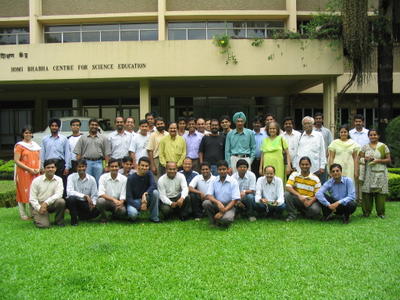
Sitting (LTR)
Amish Munshi, Shrikant Gaikwad, Swapnil Hajare, Venkatesh Hariharan, Khader Abbeb N, Gora Mohanty, Basanta Shrestha, Ramkrishna Reddy, G Karunakar, Vijay Kumar, Ravishankar Shrivastava, Sunil Mohan, Lalit Kumar
Standing (LTR, in the order of faces)
Shanu Grover, Harmeet Singh, Kartik Mistry, Satish Mohan, Sankarshan Mukhopadyay, Nirav Mehta, Subir Pradhanang, Soumyadip Modak, Nagarjuna G, M D Kulkarni, Prasanta Baruah, Sayamindu Dasgupta, Abhijit Dutta, Vainateya Koratkar, Baishampayan `Bhaskar' Ghose, Warren Noronha, Jaswinder Singh Phulewala, R Hari, Alka Irani, Naveen Kumar, Sasikumar M, Jitendra Shah, Vigneshwaran R, Monika Shah, Deepu Abraham, Priti Patil.

Sitting (LTR)
Amish Munshi, Shrikant Gaikwad, Swapnil Hajare, Venkatesh Hariharan, Khader Abbeb N, Gora Mohanty, Basanta Shrestha, Ramkrishna Reddy, G Karunakar, Vijay Kumar, Ravishankar Shrivastava, Sunil Mohan, Lalit Kumar
Standing (LTR, in the order of faces)
Shanu Grover, Harmeet Singh, Kartik Mistry, Satish Mohan, Sankarshan Mukhopadyay, Nirav Mehta, Subir Pradhanang, Soumyadip Modak, Nagarjuna G, M D Kulkarni, Prasanta Baruah, Sayamindu Dasgupta, Abhijit Dutta, Vainateya Koratkar, Baishampayan `Bhaskar' Ghose, Warren Noronha, Jaswinder Singh Phulewala, R Hari, Alka Irani, Naveen Kumar, Sasikumar M, Jitendra Shah, Vigneshwaran R, Monika Shah, Deepu Abraham, Priti Patil.
Opera
opera goes free get it here , i don't know whether it is free as freedom. Anyway atleast now one can enjoy the full featured opera browsing without any add banners.
Tuesday, September 20, 2005

Tuesday, September 13, 2005
Some footages of indicdevel meet day 1 and day 2
For the first time i have been to a meet of this nature where all the indic developers are sitting together for a common agenda of getting more and more work done for common cause of free software.
Earlier i had a thought that free/freedom software is a buzzword but here i came to conclusion that people are working and really working hard for the philosophy of free software.
Day 1:
------
It started with a opening talk of karunakar followed by gora's talk. Gora made it clear enough to have a finely chalked out issues to be discussed and the final deliverables after the meet.
After a short intro of the participants present here, we started as per our schedule.
started with input method(IIIMF, XKB , SCIM) by karunakar, gora and sunil mohan. It was nice to have a insight of these methods. As i think input method is one of the major hurdle in getting close to a huge user base. And we need to do something to ease it.
The issue of "mukt" and "muft" software is discussed with some heated exchanges and then i thought that again i got into a political meet and nothing will be coming out from here. But with some balanced wisdom of gora's intervention everything calmed down and people out here got onto their technical grooves. Anyway some people are still there who are dragging us to political mileage.
Well it is always there.
Some inputs from sunil and gora about conversion and keymaps was very valuable to carry on.
For the day one i bunked hands on session and been to one of my firend and enjoyed there a lot with him.
While people out here got into hacking session and developed a spell checker for OO1.1.4 using Hunspell. Gora and kartik did a Aspell in gujarati.
Day 2
-----
The day started with Abhijit dutta and gora talk of locales and collations - glibc, CLDR.
After that we have a tutorial session of sunil and gora of charsets and code conversion form ASCII to Unicode.
Karunakar talked about the Testing framework of the indic supported software and showed some of he live examples. One of the example was of Font switch in OpenOffice.
Sayamindu talked about CVS, bugzilla and patching, his talk on CVS and patching was nice and worth learning but it was very superficial for the guy who didn't configured and administered the CVS server. Anyway i will try some other time and can learn those CVS gizmos.
After lunch we had a talk by kartik, subir and me, kartik talked about how to use translate tool for making openoffice GSI, i talked** about some do's and don't of openoffice pot translation. I have shared my experience of working with Telugu translator and people out here agreed to have a translation guidelines for openoffice. Subir talked about khmeros site info and pavel sites.
Then basanta and kartik talked about mozilla localization using mozilla translator.
And the day ends with a conclusive session by gora.
**this is for the first time i had talked in front of so many people and i was very stammering but at last i made it and had a nice time talking about the openoffice translation.
Anyway this is for the fun of knowing and sharing something. :-)),
Earlier i had a thought that free/freedom software is a buzzword but here i came to conclusion that people are working and really working hard for the philosophy of free software.
Day 1:
------
It started with a opening talk of karunakar followed by gora's talk. Gora made it clear enough to have a finely chalked out issues to be discussed and the final deliverables after the meet.
After a short intro of the participants present here, we started as per our schedule.
started with input method(IIIMF, XKB , SCIM) by karunakar, gora and sunil mohan. It was nice to have a insight of these methods. As i think input method is one of the major hurdle in getting close to a huge user base. And we need to do something to ease it.
The issue of "mukt" and "muft" software is discussed with some heated exchanges and then i thought that again i got into a political meet and nothing will be coming out from here. But with some balanced wisdom of gora's intervention everything calmed down and people out here got onto their technical grooves. Anyway some people are still there who are dragging us to political mileage.
Well it is always there.
Some inputs from sunil and gora about conversion and keymaps was very valuable to carry on.
For the day one i bunked hands on session and been to one of my firend and enjoyed there a lot with him.
While people out here got into hacking session and developed a spell checker for OO1.1.4 using Hunspell. Gora and kartik did a Aspell in gujarati.
Day 2
-----
The day started with Abhijit dutta and gora talk of locales and collations - glibc, CLDR.
After that we have a tutorial session of sunil and gora of charsets and code conversion form ASCII to Unicode.
Karunakar talked about the Testing framework of the indic supported software and showed some of he live examples. One of the example was of Font switch in OpenOffice.
Sayamindu talked about CVS, bugzilla and patching, his talk on CVS and patching was nice and worth learning but it was very superficial for the guy who didn't configured and administered the CVS server. Anyway i will try some other time and can learn those CVS gizmos.
After lunch we had a talk by kartik, subir and me, kartik talked about how to use translate tool for making openoffice GSI, i talked** about some do's and don't of openoffice pot translation. I have shared my experience of working with Telugu translator and people out here agreed to have a translation guidelines for openoffice. Subir talked about khmeros site info and pavel sites.
Then basanta and kartik talked about mozilla localization using mozilla translator.
And the day ends with a conclusive session by gora.
**this is for the first time i had talked in front of so many people and i was very stammering but at last i made it and had a nice time talking about the openoffice translation.
Anyway this is for the fun of knowing and sharing something. :-)),
Tuesday, September 06, 2005
How to localize gaim1.5.0
To localize gaim1.5.0 for Linux box. Steps are as follows..
1. Get source1.5.0 tarball from http://gaim.sourceforge.net/
2. Untar it $tar zxvf gaim-1.5.0.tar.gz. You will get a directory named gaim-1.5.0
3. In the directory gaim-1.5.0/po/, you will find a gaim.pot file which is a po template file.
4. Translate the gaim.pot file and save it there in the same directory(gaim-1.5.0/po/) as "Lang.po", where "Lang" is the target language for which you have translated the pot file.
For ex: if you have translated the gaim.pot file for telugu then save this file after complete
translation as "te.po".
5. In the directory gaim-1.5.0 , you will find configure file. Add "te" to ALL_LINGUAS variable.
ALL_LINGUAS="am az bg ca cs da de en_AU en_CA en_GB es et fi fr he hi hu it ja ka ko lt mk my_MM nb nl nn pa pl pt_BR pt ro ru sk sl sq sr sr@Latn sv te tr uk vi xh zh_CN zh_TW"
6. Further current directory as gaim-1.5.0 , configure the source as
$./configure
then,
$make
and then,
$make install
7. The gaim with your language is installed to your system. If you want to run gaim in the language for which you localized, change the locale of your system by $LANG=te_US and then run gaim.
8. If you want to make rpm from the source inclusive of your language. The above 5 steps is followed and then tar the gaim-1.5.0 directory as $tar zcvf gaim-1.5.0.tar.gz gaim-1.5.0 and put this gaim-1.5.0.tar.gz to /usr/src/redhat/SOURCES. Copy gaim.spec from "gaim-1.5.0/gaim.spec" to /usr/src/redhat/SPECS. And as a super user run
$rpmbuild -ba gaim.spec from the /usr/src/redhat/SPECS/ directory.
After successfull completion of the above command rpm will be builded in
/usr/src/redhat/RPMS/i386 directory "gaim-1.5.0-0.i386.rpm".
1. Get source1.5.0 tarball from http://gaim.sourceforge.net/
2. Untar it $tar zxvf gaim-1.5.0.tar.gz. You will get a directory named gaim-1.5.0
3. In the directory gaim-1.5.0/po/, you will find a gaim.pot file which is a po template file.
4. Translate the gaim.pot file and save it there in the same directory(gaim-1.5.0/po/) as "Lang.po", where "Lang" is the target language for which you have translated the pot file.
For ex: if you have translated the gaim.pot file for telugu then save this file after complete
translation as "te.po".
5. In the directory gaim-1.5.0 , you will find configure file. Add "te" to ALL_LINGUAS variable.
ALL_LINGUAS="am az bg ca cs da de en_AU en_CA en_GB es et fi fr he hi hu it ja ka ko lt mk my_MM nb nl nn pa pl pt_BR pt ro ru sk sl sq sr sr@Latn sv te tr uk vi xh zh_CN zh_TW"
6. Further current directory as gaim-1.5.0 , configure the source as
$./configure
then,
$make
and then,
$make install
7. The gaim with your language is installed to your system. If you want to run gaim in the language for which you localized, change the locale of your system by $LANG=te_US and then run gaim.
8. If you want to make rpm from the source inclusive of your language. The above 5 steps is followed and then tar the gaim-1.5.0 directory as $tar zcvf gaim-1.5.0.tar.gz gaim-1.5.0 and put this gaim-1.5.0.tar.gz to /usr/src/redhat/SOURCES. Copy gaim.spec from "gaim-1.5.0/gaim.spec" to /usr/src/redhat/SPECS. And as a super user run
$rpmbuild -ba gaim.spec from the /usr/src/redhat/SPECS/ directory.
After successfull completion of the above command rpm will be builded in
/usr/src/redhat/RPMS/i386 directory "gaim-1.5.0-0.i386.rpm".
Saturday, September 03, 2005
File Redirection
Some of the file redirection commands...
2> file direct stderr to file
> file 2>&1 direct both stdout and stderr to file
>> file 2>&1 append both stdout and stderr to file
2>&1 | command pipe stdout and stderr to command
To redirect stdout and stderr to two separate files you can do:
$ command 1> out_file 2> err_file
or, since the redirection defaults to stdout:
$ command > out_file 2> err_file
With the Bourne shell you can specify other file descriptors (3 through 9) and redirect output through them. This is done with the form:
n>&m redirect file descriptor n to file descriptor m
We used the above to send stderr (2) to the same place as stdout (1), 2>&1, when we wanted to have error messages and normal messages to go to file instead of the terminal. If we wanted only the error messages to go to the file we could do this by using a place holder file descriptor, 3. We'll first redirect 3 to 2, then redirect 2 to 1, and finally, we'll redirect 1 to 3:
$ (command 3>&2 2>&1 1>&3) > file
This sends stderr to 3 then to 1, and stdout to 3, which is redirected to 2. So, in effect, we've reversed file descriptors 1 and 2 from their normal meaning. We might use this in the following example:
$ (cat file 3>&2 2>&1 1>&3) > errfile
So if file is read the information is discarded from the command output, but if file can't be read the error message is put in errfile for your later use.
You can close file descriptors when you're done with them:
m<&- closes an input file descriptor
<&- closes stdin
m>&- closes an output file descriptor
>&- closes stdout
2> file direct stderr to file
> file 2>&1 direct both stdout and stderr to file
>> file 2>&1 append both stdout and stderr to file
2>&1 | command pipe stdout and stderr to command
To redirect stdout and stderr to two separate files you can do:
$ command 1> out_file 2> err_file
or, since the redirection defaults to stdout:
$ command > out_file 2> err_file
With the Bourne shell you can specify other file descriptors (3 through 9) and redirect output through them. This is done with the form:
n>&m redirect file descriptor n to file descriptor m
We used the above to send stderr (2) to the same place as stdout (1), 2>&1, when we wanted to have error messages and normal messages to go to file instead of the terminal. If we wanted only the error messages to go to the file we could do this by using a place holder file descriptor, 3. We'll first redirect 3 to 2, then redirect 2 to 1, and finally, we'll redirect 1 to 3:
$ (command 3>&2 2>&1 1>&3) > file
This sends stderr to 3 then to 1, and stdout to 3, which is redirected to 2. So, in effect, we've reversed file descriptors 1 and 2 from their normal meaning. We might use this in the following example:
$ (cat file 3>&2 2>&1 1>&3) > errfile
So if file is read the information is discarded from the command output, but if file can't be read the error message is put in errfile for your later use.
You can close file descriptors when you're done with them:
m<&- closes an input file descriptor
<&- closes stdin
m>&- closes an output file descriptor
>&- closes stdout
Friday, August 26, 2005
cpio: MD5 sum mismatch on rpms created during build process under updated fedora-core3
This is the error message while running
$rpm -ihv *.rpm
error: unpacking of archive failed on file /opt/openoffice.org1.9.125/program/libgcc_s.so.1.1;430edcb0: cpio: MD5 sum mismatch
Error is for this package openoffice.org-core05-1.9.125-1.i586.rpm.
After complete installation of the packages when we run $openoffice.org-1.9 command it give error of shared objects(*.so.) not found for "javaldx" and "soffice.bin".
If you've been seeing these under "Updated fedora" it's because /lib/libgcc_s.so.1
is normally prelinked and this isn't working well with the normal rpm architecture for fedora, as a hackaround comment out the
%__prelink_undo_cmd /usr/sbin/prelink prelink -y library in /etc/rpm/macros.prelink
See
https://bugzilla.redhat.com/bugzilla/show_bug.cgi?id=149465 for details.
Alternatively when it makes its way into a release, configure oosource --with-system-stdlibs will avoid the problem.
Well if one don't want to do the above steps, he can run the same rpm command as:
$rpm --nomd5 -ihv *.rpm
The above command will not check for md5sum and all the packages will be installed and i think it will work fine also. As in my case OO is running without any fail.
But the correct way is to configure it with the above said option.
I think this problem is with the updated version of fedora-core3 but i am not sure about it right now.
$rpm -ihv *.rpm
error: unpacking of archive failed on file /opt/openoffice.org1.9.125/program/libgcc_s.so.1.1;430edcb0: cpio: MD5 sum mismatch
Error is for this package openoffice.org-core05-1.9.125-1.i586.rpm.
After complete installation of the packages when we run $openoffice.org-1.9 command it give error of shared objects(*.so.) not found for "javaldx" and "soffice.bin".
If you've been seeing these under "Updated fedora" it's because /lib/libgcc_s.so.1
is normally prelinked and this isn't working well with the normal rpm architecture for fedora, as a hackaround comment out the
%__prelink_undo_cmd /usr/sbin/prelink prelink -y library in /etc/rpm/macros.prelink
See
https://bugzilla.redhat.com/bugzilla/show_bug.cgi?id=149465 for details.
Alternatively when it makes its way into a release, configure oosource --with-system-stdlibs will avoid the problem.
Well if one don't want to do the above steps, he can run the same rpm command as:
$rpm --nomd5 -ihv *.rpm
The above command will not check for md5sum and all the packages will be installed and i think it will work fine also. As in my case OO is running without any fail.
But the correct way is to configure it with the above said option.
I think this problem is with the updated version of fedora-core3 but i am not sure about it right now.
Subscribe to:
Posts (Atom)