Thursday, September 29, 2005
Thursday, September 22, 2005
IndicDevelMeet 2
cheers...
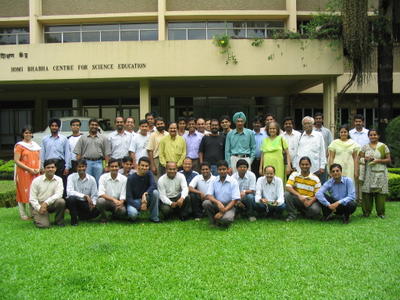
Sitting (LTR)
Amish Munshi, Shrikant Gaikwad, Swapnil Hajare, Venkatesh Hariharan, Khader Abbeb N, Gora Mohanty, Basanta Shrestha, Ramkrishna Reddy, G Karunakar, Vijay Kumar, Ravishankar Shrivastava, Sunil Mohan, Lalit Kumar
Standing (LTR, in the order of faces)
Shanu Grover, Harmeet Singh, Kartik Mistry, Satish Mohan, Sankarshan Mukhopadyay, Nirav Mehta, Subir Pradhanang, Soumyadip Modak, Nagarjuna G, M D Kulkarni, Prasanta Baruah, Sayamindu Dasgupta, Abhijit Dutta, Vainateya Koratkar, Baishampayan `Bhaskar' Ghose, Warren Noronha, Jaswinder Singh Phulewala, R Hari, Alka Irani, Naveen Kumar, Sasikumar M, Jitendra Shah, Vigneshwaran R, Monika Shah, Deepu Abraham, Priti Patil.

Sitting (LTR)
Amish Munshi, Shrikant Gaikwad, Swapnil Hajare, Venkatesh Hariharan, Khader Abbeb N, Gora Mohanty, Basanta Shrestha, Ramkrishna Reddy, G Karunakar, Vijay Kumar, Ravishankar Shrivastava, Sunil Mohan, Lalit Kumar
Standing (LTR, in the order of faces)
Shanu Grover, Harmeet Singh, Kartik Mistry, Satish Mohan, Sankarshan Mukhopadyay, Nirav Mehta, Subir Pradhanang, Soumyadip Modak, Nagarjuna G, M D Kulkarni, Prasanta Baruah, Sayamindu Dasgupta, Abhijit Dutta, Vainateya Koratkar, Baishampayan `Bhaskar' Ghose, Warren Noronha, Jaswinder Singh Phulewala, R Hari, Alka Irani, Naveen Kumar, Sasikumar M, Jitendra Shah, Vigneshwaran R, Monika Shah, Deepu Abraham, Priti Patil.
Opera
opera goes free get it here , i don't know whether it is free as freedom. Anyway atleast now one can enjoy the full featured opera browsing without any add banners.
Tuesday, September 20, 2005

Tuesday, September 13, 2005
Some footages of indicdevel meet day 1 and day 2
For the first time i have been to a meet of this nature where all the indic developers are sitting together for a common agenda of getting more and more work done for common cause of free software.
Earlier i had a thought that free/freedom software is a buzzword but here i came to conclusion that people are working and really working hard for the philosophy of free software.
Day 1:
------
It started with a opening talk of karunakar followed by gora's talk. Gora made it clear enough to have a finely chalked out issues to be discussed and the final deliverables after the meet.
After a short intro of the participants present here, we started as per our schedule.
started with input method(IIIMF, XKB , SCIM) by karunakar, gora and sunil mohan. It was nice to have a insight of these methods. As i think input method is one of the major hurdle in getting close to a huge user base. And we need to do something to ease it.
The issue of "mukt" and "muft" software is discussed with some heated exchanges and then i thought that again i got into a political meet and nothing will be coming out from here. But with some balanced wisdom of gora's intervention everything calmed down and people out here got onto their technical grooves. Anyway some people are still there who are dragging us to political mileage.
Well it is always there.
Some inputs from sunil and gora about conversion and keymaps was very valuable to carry on.
For the day one i bunked hands on session and been to one of my firend and enjoyed there a lot with him.
While people out here got into hacking session and developed a spell checker for OO1.1.4 using Hunspell. Gora and kartik did a Aspell in gujarati.
Day 2
-----
The day started with Abhijit dutta and gora talk of locales and collations - glibc, CLDR.
After that we have a tutorial session of sunil and gora of charsets and code conversion form ASCII to Unicode.
Karunakar talked about the Testing framework of the indic supported software and showed some of he live examples. One of the example was of Font switch in OpenOffice.
Sayamindu talked about CVS, bugzilla and patching, his talk on CVS and patching was nice and worth learning but it was very superficial for the guy who didn't configured and administered the CVS server. Anyway i will try some other time and can learn those CVS gizmos.
After lunch we had a talk by kartik, subir and me, kartik talked about how to use translate tool for making openoffice GSI, i talked** about some do's and don't of openoffice pot translation. I have shared my experience of working with Telugu translator and people out here agreed to have a translation guidelines for openoffice. Subir talked about khmeros site info and pavel sites.
Then basanta and kartik talked about mozilla localization using mozilla translator.
And the day ends with a conclusive session by gora.
**this is for the first time i had talked in front of so many people and i was very stammering but at last i made it and had a nice time talking about the openoffice translation.
Anyway this is for the fun of knowing and sharing something. :-)),
Earlier i had a thought that free/freedom software is a buzzword but here i came to conclusion that people are working and really working hard for the philosophy of free software.
Day 1:
------
It started with a opening talk of karunakar followed by gora's talk. Gora made it clear enough to have a finely chalked out issues to be discussed and the final deliverables after the meet.
After a short intro of the participants present here, we started as per our schedule.
started with input method(IIIMF, XKB , SCIM) by karunakar, gora and sunil mohan. It was nice to have a insight of these methods. As i think input method is one of the major hurdle in getting close to a huge user base. And we need to do something to ease it.
The issue of "mukt" and "muft" software is discussed with some heated exchanges and then i thought that again i got into a political meet and nothing will be coming out from here. But with some balanced wisdom of gora's intervention everything calmed down and people out here got onto their technical grooves. Anyway some people are still there who are dragging us to political mileage.
Well it is always there.
Some inputs from sunil and gora about conversion and keymaps was very valuable to carry on.
For the day one i bunked hands on session and been to one of my firend and enjoyed there a lot with him.
While people out here got into hacking session and developed a spell checker for OO1.1.4 using Hunspell. Gora and kartik did a Aspell in gujarati.
Day 2
-----
The day started with Abhijit dutta and gora talk of locales and collations - glibc, CLDR.
After that we have a tutorial session of sunil and gora of charsets and code conversion form ASCII to Unicode.
Karunakar talked about the Testing framework of the indic supported software and showed some of he live examples. One of the example was of Font switch in OpenOffice.
Sayamindu talked about CVS, bugzilla and patching, his talk on CVS and patching was nice and worth learning but it was very superficial for the guy who didn't configured and administered the CVS server. Anyway i will try some other time and can learn those CVS gizmos.
After lunch we had a talk by kartik, subir and me, kartik talked about how to use translate tool for making openoffice GSI, i talked** about some do's and don't of openoffice pot translation. I have shared my experience of working with Telugu translator and people out here agreed to have a translation guidelines for openoffice. Subir talked about khmeros site info and pavel sites.
Then basanta and kartik talked about mozilla localization using mozilla translator.
And the day ends with a conclusive session by gora.
**this is for the first time i had talked in front of so many people and i was very stammering but at last i made it and had a nice time talking about the openoffice translation.
Anyway this is for the fun of knowing and sharing something. :-)),
Tuesday, September 06, 2005
How to localize gaim1.5.0
To localize gaim1.5.0 for Linux box. Steps are as follows..
1. Get source1.5.0 tarball from http://gaim.sourceforge.net/
2. Untar it $tar zxvf gaim-1.5.0.tar.gz. You will get a directory named gaim-1.5.0
3. In the directory gaim-1.5.0/po/, you will find a gaim.pot file which is a po template file.
4. Translate the gaim.pot file and save it there in the same directory(gaim-1.5.0/po/) as "Lang.po", where "Lang" is the target language for which you have translated the pot file.
For ex: if you have translated the gaim.pot file for telugu then save this file after complete
translation as "te.po".
5. In the directory gaim-1.5.0 , you will find configure file. Add "te" to ALL_LINGUAS variable.
ALL_LINGUAS="am az bg ca cs da de en_AU en_CA en_GB es et fi fr he hi hu it ja ka ko lt mk my_MM nb nl nn pa pl pt_BR pt ro ru sk sl sq sr sr@Latn sv te tr uk vi xh zh_CN zh_TW"
6. Further current directory as gaim-1.5.0 , configure the source as
$./configure
then,
$make
and then,
$make install
7. The gaim with your language is installed to your system. If you want to run gaim in the language for which you localized, change the locale of your system by $LANG=te_US and then run gaim.
8. If you want to make rpm from the source inclusive of your language. The above 5 steps is followed and then tar the gaim-1.5.0 directory as $tar zcvf gaim-1.5.0.tar.gz gaim-1.5.0 and put this gaim-1.5.0.tar.gz to /usr/src/redhat/SOURCES. Copy gaim.spec from "gaim-1.5.0/gaim.spec" to /usr/src/redhat/SPECS. And as a super user run
$rpmbuild -ba gaim.spec from the /usr/src/redhat/SPECS/ directory.
After successfull completion of the above command rpm will be builded in
/usr/src/redhat/RPMS/i386 directory "gaim-1.5.0-0.i386.rpm".
1. Get source1.5.0 tarball from http://gaim.sourceforge.net/
2. Untar it $tar zxvf gaim-1.5.0.tar.gz. You will get a directory named gaim-1.5.0
3. In the directory gaim-1.5.0/po/, you will find a gaim.pot file which is a po template file.
4. Translate the gaim.pot file and save it there in the same directory(gaim-1.5.0/po/) as "Lang.po", where "Lang" is the target language for which you have translated the pot file.
For ex: if you have translated the gaim.pot file for telugu then save this file after complete
translation as "te.po".
5. In the directory gaim-1.5.0 , you will find configure file. Add "te" to ALL_LINGUAS variable.
ALL_LINGUAS="am az bg ca cs da de en_AU en_CA en_GB es et fi fr he hi hu it ja ka ko lt mk my_MM nb nl nn pa pl pt_BR pt ro ru sk sl sq sr sr@Latn sv te tr uk vi xh zh_CN zh_TW"
6. Further current directory as gaim-1.5.0 , configure the source as
$./configure
then,
$make
and then,
$make install
7. The gaim with your language is installed to your system. If you want to run gaim in the language for which you localized, change the locale of your system by $LANG=te_US and then run gaim.
8. If you want to make rpm from the source inclusive of your language. The above 5 steps is followed and then tar the gaim-1.5.0 directory as $tar zcvf gaim-1.5.0.tar.gz gaim-1.5.0 and put this gaim-1.5.0.tar.gz to /usr/src/redhat/SOURCES. Copy gaim.spec from "gaim-1.5.0/gaim.spec" to /usr/src/redhat/SPECS. And as a super user run
$rpmbuild -ba gaim.spec from the /usr/src/redhat/SPECS/ directory.
After successfull completion of the above command rpm will be builded in
/usr/src/redhat/RPMS/i386 directory "gaim-1.5.0-0.i386.rpm".
Saturday, September 03, 2005
File Redirection
Some of the file redirection commands...
2> file direct stderr to file
> file 2>&1 direct both stdout and stderr to file
>> file 2>&1 append both stdout and stderr to file
2>&1 | command pipe stdout and stderr to command
To redirect stdout and stderr to two separate files you can do:
$ command 1> out_file 2> err_file
or, since the redirection defaults to stdout:
$ command > out_file 2> err_file
With the Bourne shell you can specify other file descriptors (3 through 9) and redirect output through them. This is done with the form:
n>&m redirect file descriptor n to file descriptor m
We used the above to send stderr (2) to the same place as stdout (1), 2>&1, when we wanted to have error messages and normal messages to go to file instead of the terminal. If we wanted only the error messages to go to the file we could do this by using a place holder file descriptor, 3. We'll first redirect 3 to 2, then redirect 2 to 1, and finally, we'll redirect 1 to 3:
$ (command 3>&2 2>&1 1>&3) > file
This sends stderr to 3 then to 1, and stdout to 3, which is redirected to 2. So, in effect, we've reversed file descriptors 1 and 2 from their normal meaning. We might use this in the following example:
$ (cat file 3>&2 2>&1 1>&3) > errfile
So if file is read the information is discarded from the command output, but if file can't be read the error message is put in errfile for your later use.
You can close file descriptors when you're done with them:
m<&- closes an input file descriptor
<&- closes stdin
m>&- closes an output file descriptor
>&- closes stdout
2> file direct stderr to file
> file 2>&1 direct both stdout and stderr to file
>> file 2>&1 append both stdout and stderr to file
2>&1 | command pipe stdout and stderr to command
To redirect stdout and stderr to two separate files you can do:
$ command 1> out_file 2> err_file
or, since the redirection defaults to stdout:
$ command > out_file 2> err_file
With the Bourne shell you can specify other file descriptors (3 through 9) and redirect output through them. This is done with the form:
n>&m redirect file descriptor n to file descriptor m
We used the above to send stderr (2) to the same place as stdout (1), 2>&1, when we wanted to have error messages and normal messages to go to file instead of the terminal. If we wanted only the error messages to go to the file we could do this by using a place holder file descriptor, 3. We'll first redirect 3 to 2, then redirect 2 to 1, and finally, we'll redirect 1 to 3:
$ (command 3>&2 2>&1 1>&3) > file
This sends stderr to 3 then to 1, and stdout to 3, which is redirected to 2. So, in effect, we've reversed file descriptors 1 and 2 from their normal meaning. We might use this in the following example:
$ (cat file 3>&2 2>&1 1>&3) > errfile
So if file is read the information is discarded from the command output, but if file can't be read the error message is put in errfile for your later use.
You can close file descriptors when you're done with them:
m<&- closes an input file descriptor
<&- closes stdin
m>&- closes an output file descriptor
>&- closes stdout
Friday, August 26, 2005
cpio: MD5 sum mismatch on rpms created during build process under updated fedora-core3
This is the error message while running
$rpm -ihv *.rpm
error: unpacking of archive failed on file /opt/openoffice.org1.9.125/program/libgcc_s.so.1.1;430edcb0: cpio: MD5 sum mismatch
Error is for this package openoffice.org-core05-1.9.125-1.i586.rpm.
After complete installation of the packages when we run $openoffice.org-1.9 command it give error of shared objects(*.so.) not found for "javaldx" and "soffice.bin".
If you've been seeing these under "Updated fedora" it's because /lib/libgcc_s.so.1
is normally prelinked and this isn't working well with the normal rpm architecture for fedora, as a hackaround comment out the
%__prelink_undo_cmd /usr/sbin/prelink prelink -y library in /etc/rpm/macros.prelink
See
https://bugzilla.redhat.com/bugzilla/show_bug.cgi?id=149465 for details.
Alternatively when it makes its way into a release, configure oosource --with-system-stdlibs will avoid the problem.
Well if one don't want to do the above steps, he can run the same rpm command as:
$rpm --nomd5 -ihv *.rpm
The above command will not check for md5sum and all the packages will be installed and i think it will work fine also. As in my case OO is running without any fail.
But the correct way is to configure it with the above said option.
I think this problem is with the updated version of fedora-core3 but i am not sure about it right now.
$rpm -ihv *.rpm
error: unpacking of archive failed on file /opt/openoffice.org1.9.125/program/libgcc_s.so.1.1;430edcb0: cpio: MD5 sum mismatch
Error is for this package openoffice.org-core05-1.9.125-1.i586.rpm.
After complete installation of the packages when we run $openoffice.org-1.9 command it give error of shared objects(*.so.) not found for "javaldx" and "soffice.bin".
If you've been seeing these under "Updated fedora" it's because /lib/libgcc_s.so.1
is normally prelinked and this isn't working well with the normal rpm architecture for fedora, as a hackaround comment out the
%__prelink_undo_cmd /usr/sbin/prelink prelink -y library in /etc/rpm/macros.prelink
See
https://bugzilla.redhat.com/bugzilla/show_bug.cgi?id=149465 for details.
Alternatively when it makes its way into a release, configure oosource --with-system-stdlibs will avoid the problem.
Well if one don't want to do the above steps, he can run the same rpm command as:
$rpm --nomd5 -ihv *.rpm
The above command will not check for md5sum and all the packages will be installed and i think it will work fine also. As in my case OO is running without any fail.
But the correct way is to configure it with the above said option.
I think this problem is with the updated version of fedora-core3 but i am not sure about it right now.
Friday, August 19, 2005
How to migrate OO1.1.3 Gsi to OO 2.0 Gsi , scripts and steps to follow.
The steps and scripts used for the migration of OO1.1.3 Gsi to OO2.0 Gsi is available at..
http://ncb.ernet.in/~vijaykumar
http://ncb.ernet.in/~vijaykumar
Useful tips from Dwayne Bailey
Subject: How to creating non-English language Po translation files
I've just been documenting how to create non-English source language
files for Mozilla and have added some info for OOo here:
http://translate.sourceforge.net/wiki/toolkit/oo2po
Use this:
oo2po -P --source-language=fr GSI_fr.sdf french-pot
This will create .pot files with French (fr) as the source language
using GSI_fr.sdf and putting all the files into french-pot
To create a set of PO files with your translation and a different source
languages try this. Here we are creating a source language of Afrikaans
(af) and a target language of Xhosa (xh)
Take your existing SDF files
cat GSI_af.sdf GSI_xh.sdf > GSI_af-xh.sdf
oo2po --source-language=af -lxh GSI_af-xh.sdf po
Using your combined SDF file this will create PO files with Afrikaans in
the msgid and Xhosa in the msgstr and output them into a directory
called po.
To create a new SDF file after translating do the following:
po2oo -lxh -t en-US.sdf af-xh new.sdf
This uses an en-US.sdf file as a template and read po files from af-xh
placing them in new.sdf
NOTE: I checked the produced GSI file using gsicheck. But if you are
going to rely on this method I suggest a more thorough check, maybe do
it in small stages.
I've just been documenting how to create non-English source language
files for Mozilla and have added some info for OOo here:
http://translate.sourceforge.net/wiki/toolkit/oo2po
Use this:
oo2po -P --source-language=fr GSI_fr.sdf french-pot
This will create .pot files with French (fr) as the source language
using GSI_fr.sdf and putting all the files into french-pot
To create a set of PO files with your translation and a different source
languages try this. Here we are creating a source language of Afrikaans
(af) and a target language of Xhosa (xh)
Take your existing SDF files
cat GSI_af.sdf GSI_xh.sdf > GSI_af-xh.sdf
oo2po --source-language=af -lxh GSI_af-xh.sdf po
Using your combined SDF file this will create PO files with Afrikaans in
the msgid and Xhosa in the msgstr and output them into a directory
called po.
To create a new SDF file after translating do the following:
po2oo -lxh -t en-US.sdf af-xh new.sdf
This uses an en-US.sdf file as a template and read po files from af-xh
placing them in new.sdf
NOTE: I checked the produced GSI file using gsicheck. But if you are
going to rely on this method I suggest a more thorough check, maybe do
it in small stages.
Tuesday, August 02, 2005
Configuring and building gnopernicus..
While building gnopernicus on fedora core3 i came through some of the errors of configuring it.
To the source directory of gnopernicus i typed the command $./configure, after some time it gave error that some of the packages like gconf2, gnome-mag, at , at-spi etc is not found.
To find the packages required for building, configure script is using $pkg-config. pkg-config command looks for the package information in /usr/lib/pkgconfig/package-name.pc files.
So if there is any package not found error with configure script, then we can look for it's corresponding .pc file in /usr/lib/pkgconfig directory. And if it's not there install the devel part of the package which is not found.
I installed gnome-mag-devel(for gnome-mag-1.0.pc) , at-spi-devel(for cspi-1.0.pc) and configured, it worked.
Next i did $make, completed without any error.
then $make install, which gave one error of not finding the path to put some xml and .schema files.
so i explicitly made the path as /usr/local/etc/gconf/ by creating a directory gconf in /usr/local/etc.
And finally $make install installed gnopernicus.
Which is working fine.
To the source directory of gnopernicus i typed the command $./configure, after some time it gave error that some of the packages like gconf2, gnome-mag, at , at-spi etc is not found.
To find the packages required for building, configure script is using $pkg-config. pkg-config command looks for the package information in /usr/lib/pkgconfig/package-name.pc files.
So if there is any package not found error with configure script, then we can look for it's corresponding .pc file in /usr/lib/pkgconfig directory. And if it's not there install the devel part of the package which is not found.
I installed gnome-mag-devel(for gnome-mag-1.0.pc) , at-spi-devel(for cspi-1.0.pc) and configured, it worked.
Next i did $make, completed without any error.
then $make install, which gave one error of not finding the path to put some xml and .schema files.
so i explicitly made the path as /usr/local/etc/gconf/ by creating a directory gconf in /usr/local/etc.
And finally $make install installed gnopernicus.
Which is working fine.
Saturday, July 16, 2005
Font Substitution in OOo 2.0
Here is a good suggestion from Joerg Barfuth
---------------------------------------------
RKVS Raman wrote:
> 2) The second way is that we asked the user to copy the Common.xcu (
> File is attached) to
>
> C:\Documents and Settings\raman\Application
> Data\OpenOffice.org1.9.103\user\registry\data\org\openoffice\Office
>
> where 'C:\Document and Settings\raman' could be replaced by your home directory
>
> In this case the Font Substitution information already exist and is
> the 'Saab' font developed by u
>
> Please install Saab font before OOo installation.
>
> 3) The third way (and the best way) is to write a script which does
> this copying of Common.xcu
>
Still better would be to integrate this change into the shared
configuration. You can install your special Common.xcu using
'/program/unopkg add --shared Common.xcu' and the contained
settings will be available to all users. You may also try including this
directly into the installation package, so it is installed under
/share/registry. In either case the settings apply to all users
automatically.
Before you do any of this, you should clean up the file, and remove the
settings that are outside of the FontSubstitution tag.
HTH, Joerg
---------------------------------------------
RKVS Raman wrote:
> 2) The second way is that we asked the user to copy the Common.xcu (
> File is attached) to
>
> C:\Documents and Settings\raman\Application
> Data\OpenOffice.org1.9.103\user\registry\data\org\openoffice\Office
>
> where 'C:\Document and Settings\raman' could be replaced by your home directory
>
> In this case the Font Substitution information already exist and is
> the 'Saab' font developed by u
>
> Please install Saab font before OOo installation.
>
> 3) The third way (and the best way) is to write a script which does
> this copying of Common.xcu
>
Still better would be to integrate this change into the shared
configuration. You can install your special Common.xcu using
'
settings will be available to all users. You may also try including this
directly into the installation package, so it is installed under
automatically.
Before you do any of this, you should clean up the file, and remove the
settings that are outside of the FontSubstitution tag.
HTH, Joerg


Tuesday, July 12, 2005
How to hack openoffice2.0 about dialog and splash.
Openoffice2.0 about dialog image can be changed by changing the file "ooo_SRC680_m100_src/default_images/svx/res/openabout.png", this is the default image used by OO2.0 for about dialog.
The string message of the about dialog is taken from the file "ooo_SRC680_m100_src/svx/source/intro/localize.sdf"
So, the strings can be changed by changing the merged string of the particular language.
Splash can be changed by changing the bmp file "ooo_SRC680_m100_src/instsetoo_native/unxlngi6.pro/bin/intro.bmp".
Enjoy hacking..
The string message of the about dialog is taken from the file "ooo_SRC680_m100_src/svx/source/intro/localize.sdf"
So, the strings can be changed by changing the merged string of the particular language.
Splash can be changed by changing the bmp file "ooo_SRC680_m100_src/instsetoo_native/unxlngi6.pro/bin/intro.bmp".
Enjoy hacking..
Monday, July 11, 2005
Not again..
It was a ruthless bouncer and as usual got passed my head. Yet again i was looking helpless. I don't know what they are looking for and i suspect whether they themselves try it or not in a real scenario.
I agree i am dumb but what about those bunch of people. We are nothing but a bunch of jokers trying to read some experienced mind.
It is there to test abilities or test their own abilities. I don't know...
But today i am not frustated because it's their turn to think about the credibility of their testing technique and dig their brain.
I agree i am dumb but what about those bunch of people. We are nothing but a bunch of jokers trying to read some experienced mind.
It is there to test abilities or test their own abilities. I don't know...
But today i am not frustated because it's their turn to think about the credibility of their testing technique and dig their brain.
Thursday, June 30, 2005
There is always an 'X.X......' at the end..
Got these lines form "Rahul Upakare" website.
MGPT is a battle.
You have to fight with grader.
Grader has two doors.
Doors are the main problems for you.
You have already got the information of both the doors.
Your job is to understand doors information completely.
Understand the structure of the door and implement the key to open the door.
The door lock may have 4/5 levers.
You have no idea how many levers are there and what is their structure.
But you can guess that from the information you have about the doors.
You have limited time and within that time you have to implement that key and try to open the door.
You will win if you manage to open the door within that specified time.
I don't have anything to say. I am still there and thinking of the same problem, solving in my mind with numerous combinations.
Yesterday i had a sound sleep otherwise i would have gone mad.
I am coming and someday i will.......
MGPT is a battle.
You have to fight with grader.
Grader has two doors.
Doors are the main problems for you.
You have already got the information of both the doors.
Your job is to understand doors information completely.
Understand the structure of the door and implement the key to open the door.
The door lock may have 4/5 levers.
You have no idea how many levers are there and what is their structure.
But you can guess that from the information you have about the doors.
You have limited time and within that time you have to implement that key and try to open the door.
You will win if you manage to open the door within that specified time.
I don't have anything to say. I am still there and thinking of the same problem, solving in my mind with numerous combinations.
Yesterday i had a sound sleep otherwise i would have gone mad.
I am coming and someday i will.......
Saturday, June 18, 2005
NTLDR is missing...
I have a dual boot system with win2000 and FC-3. I was installing some software and playing around with the bootloader.
After some time when i rebooted the system and tried to boot in win2000 it gave me the message saying "NTLDR is missing , press ctrl+alt+del to restart".
The problem with the booting in win2000 is caused because of "ntldr, ntdetect.com and boot.ini" files.
What i did to rectify the problem is booted in FC-3 and copied file boot.ini from win partition to a floppy and downloaded files 'ntdetect.com' and 'ntldr' from the internet and copied to the same floppy.
After that i rebooted the system with the floppy and it worked, i found that the 'ntldr' file is renamed as 'ntldv'. I renamed that file to 'ntldr' and rebooted again to win.
And it worked.
The "NTLDR is missing" error can also be caused because of certain changes in hardware configuration like having a floppy in floppy drive while booting the system.
After some time when i rebooted the system and tried to boot in win2000 it gave me the message saying "NTLDR is missing , press ctrl+alt+del to restart".
The problem with the booting in win2000 is caused because of "ntldr, ntdetect.com and boot.ini" files.
What i did to rectify the problem is booted in FC-3 and copied file boot.ini from win partition to a floppy and downloaded files 'ntdetect.com' and 'ntldr' from the internet and copied to the same floppy.
After that i rebooted the system with the floppy and it worked, i found that the 'ntldr' file is renamed as 'ntldv'. I renamed that file to 'ntldr' and rebooted again to win.
And it worked.
The "NTLDR is missing" error can also be caused because of certain changes in hardware configuration like having a floppy in floppy drive while booting the system.
Tuesday, May 17, 2005
How to install TTF/OTF fonts in linux
Following is the procedure to install 'OTF/TTF' fonts in Linux (eg: Fedora Core 3)
* Step 01. Download any otf/ttf font from internet and save in a directory on
your machine.
* Step 02. Go to the directory in which you have saved the font file.
Step 03. Login as root.
$su
* Step 04. Create a directory /usr/share/fonts/default/TrueType using following
command.
$ mkdir /usr/share/fonts/default/TrueType
* Step 05. Copy the font file in /usr/share/fonts/otfonts/
$ cp *.ttf /usr/share/fonts/default/TrueType
* Step 06. Go to directory /usr/share/fonts/default/TrueType
$ cd /usr/share/fonts/default/TrueType
* Step 07. Create fonts.scale
$ ttmkfdir
or
$ /usr/sbin/ttmkfdir
* Step 08. Create fonts.dir
$ mkfontdir
* Step 09. Add the path to X Font serve path
$ chkfontpath --add /usr/share/fonts/default/TrueType
or
$ /usr/sbin/chkfontpath --add /usr/share/fonts/default/TrueType
* Step 10. Update font information cache
$ fc-cache
* Step 11. Logout as root
$ exit
* Step 01. Download any otf/ttf font from internet and save in a directory on
your machine.
* Step 02. Go to the directory in which you have saved the font file.
Step 03. Login as root.
$su
* Step 04. Create a directory /usr/share/fonts/default/TrueType using following
command.
$ mkdir /usr/share/fonts/default/TrueType
* Step 05. Copy the font file in /usr/share/fonts/otfonts/
$ cp *.ttf /usr/share/fonts/default/TrueType
* Step 06. Go to directory /usr/share/fonts/default/TrueType
$ cd /usr/share/fonts/default/TrueType
* Step 07. Create fonts.scale
$ ttmkfdir
or
$ /usr/sbin/ttmkfdir
* Step 08. Create fonts.dir
$ mkfontdir
* Step 09. Add the path to X Font serve path
$ chkfontpath --add /usr/share/fonts/default/TrueType
or
$ /usr/sbin/chkfontpath --add /usr/share/fonts/default/TrueType
* Step 10. Update font information cache
$ fc-cache
* Step 11. Logout as root
$ exit
Wednesday, May 11, 2005
How to use old GSI for OO2.0
To use the old GSI we need to follow these steps.
- create PO files from 1.1.2(old) GSI
- create compendium from these PO files (Kbabel can do this for you)
- download 2.0 POT files and POT2PO script from
ftp://ftp.linux.cz/pub/localization/OpenOffice.org/devel/POT/
- use Kbabel or POEdit (or some similar program) and automatically
translate 2.0
PO files using the compendium with 100% match
- translate the rest that was not automatically translated
From our experiences numbers are something like:
- 2.0 PO has about 58000 strings
- after running Kbabel with compendium and 100% match, 36000 untranslated
strings left (32000 in helpcontent2, 4000 in the rest modules - I guess that
mostly in Base)
So, as many have already asked (like me ;-) for the localized OOo 2.0,
translation ver. 1.0 you can translate 4000 strings in the GUI and after that
get on helpcontent.
- create PO files from 1.1.2(old) GSI
- create compendium from these PO files (Kbabel can do this for you)
- download 2.0 POT files and POT2PO script from
ftp://ftp.linux.cz/pub/localization/OpenOffice.org/devel/POT/
- use Kbabel or POEdit (or some similar program) and automatically
translate 2.0
PO files using the compendium with 100% match
- translate the rest that was not automatically translated
From our experiences numbers are something like:
- 2.0 PO has about 58000 strings
- after running Kbabel with compendium and 100% match, 36000 untranslated
strings left (32000 in helpcontent2, 4000 in the rest modules - I guess that
mostly in Base)
So, as many have already asked (like me ;-) for the localized OOo 2.0,
translation ver. 1.0 you can translate 4000 strings in the GUI and after that
get on helpcontent.
Tuesday, April 19, 2005
SRC680m93 configure error
checking for javac... /usr/java/j2sdk1.4.2_06/bin/javac
checking for javadoc... /usr/java/j2sdk1.4.2_06/bin/javadoc
checking how to run the C preprocessor... gcc -E
checking how to run the C++ preprocessor... g++ -E
checking for xmkmf... /usr/X11R6/bin/xmkmf
checking for perl... /usr/bin/perl
checking the Perl version... checked (perl 5)
checking for required Perl modules... Can't locate Archive/Zip.pm in @INC (@INC contains: /usr/lib/perl5/5.8.3/i386-linux-thread-multi /usr/lib/perl5/5.8.3 /usr/lib/perl5/site_perl/5.8.3/i386-linux-thread-multi /usr/lib/perl5/site_perl/5.8.2/i386-linux-thread-multi /usr/lib/perl5/site_perl/5.8.1/i386-linux-thread-multi /usr/lib/perl5/site_perl/5.8.0/i386-linux-thread-multi /usr/lib/perl5/site_perl/5.8.3 /usr/lib/perl5/site_perl/5.8.2 /usr/lib/perl5/site_perl/5.8.1 /usr/lib/perl5/site_perl/5.8.0 /usr/lib/perl5/site_perl /usr/lib/perl5/vendor_perl/5.8.3/i386-linux-thread-multi /usr/lib/perl5/vendor_perl/5.8.2/i386-linux-thread-multi /usr/lib/perl5/vendor_perl/5.8.1/i386-linux-thread-multi /usr/lib/perl5/vendor_perl/5.8.0/i386-linux-thread-multi /usr/lib/perl5/vendor_perl/5.8.3 /usr/lib/perl5/vendor_perl/5.8.2 /usr/lib/perl5/vendor_perl/5.8.1 /usr/lib/perl5/vendor_perl/5.8.0 /usr/lib/perl5/vendor_perl .) at -e line 1.
BEGIN failed--compilation aborted at -e line 1.
configure: error: Failed to find some modules
The problem is with some of the perl modules.I am fighting with it and trying to remove this error.
checking for javadoc... /usr/java/j2sdk1.4.2_06/bin/javadoc
checking how to run the C preprocessor... gcc -E
checking how to run the C++ preprocessor... g++ -E
checking for xmkmf... /usr/X11R6/bin/xmkmf
checking for perl... /usr/bin/perl
checking the Perl version... checked (perl 5)
checking for required Perl modules... Can't locate Archive/Zip.pm in @INC (@INC contains: /usr/lib/perl5/5.8.3/i386-linux-thread-multi /usr/lib/perl5/5.8.3 /usr/lib/perl5/site_perl/5.8.3/i386-linux-thread-multi /usr/lib/perl5/site_perl/5.8.2/i386-linux-thread-multi /usr/lib/perl5/site_perl/5.8.1/i386-linux-thread-multi /usr/lib/perl5/site_perl/5.8.0/i386-linux-thread-multi /usr/lib/perl5/site_perl/5.8.3 /usr/lib/perl5/site_perl/5.8.2 /usr/lib/perl5/site_perl/5.8.1 /usr/lib/perl5/site_perl/5.8.0 /usr/lib/perl5/site_perl /usr/lib/perl5/vendor_perl/5.8.3/i386-linux-thread-multi /usr/lib/perl5/vendor_perl/5.8.2/i386-linux-thread-multi /usr/lib/perl5/vendor_perl/5.8.1/i386-linux-thread-multi /usr/lib/perl5/vendor_perl/5.8.0/i386-linux-thread-multi /usr/lib/perl5/vendor_perl/5.8.3 /usr/lib/perl5/vendor_perl/5.8.2 /usr/lib/perl5/vendor_perl/5.8.1 /usr/lib/perl5/vendor_perl/5.8.0 /usr/lib/perl5/vendor_perl .) at -e line 1.
BEGIN failed--compilation aborted at -e line 1.
configure: error: Failed to find some modules
The problem is with some of the perl modules.I am fighting with it and trying to remove this error.
Thursday, March 24, 2005
Naming convention for OO114 source directory while building
The source or root directory should not contain any '-' character, if there is '-' in the name of the source directory then build will crash in "xml2cmp" module giving LNK2001: error. Because of this '-' in name of source directory, "SOLARLIB" and "SOLARINC" variable is not properly set in "winenv.bat" and this causes linking error while building.
Subscribe to:
Posts (Atom)